Procurement integration connects procurement or P2P software with the other systems holding related data, ERP, finance, HR, vendor management, so that supplier records, purchase orders, receipts and invoices move automatically instead of being re-entered by hand.
Why procurement integration matters
Most organisations run purchasing and supplier management across several systems: an ERP for financial data, an e-procurement platform for requests and approvals, an HRIS for people data, and a Vendor Management System (VMS) for professional services and external workers. When these systems operate separately, teams compensate manually. This typically leads to:
repeated data entry across several systems
inconsistencies between supplier and financial data
approvals and status updates tracked in emails or spreadsheets
limited visibility across the Source-to-Pay process
delays in approvals, purchase orders and invoices
higher compliance and operational risk
Procurement system integration replaces these manual workarounds with structured, rule-based data flows. The gain is not only time saved, it's a more reliable, shared view of spend and status across Procurement, Finance, IT and Operations.
What systems can procurement integration connect
A procurement ecosystem rarely runs on a single platform. Each system keeps its own role, integration lets them share data without replacing the underlying stack.
| System | What it manages | Typical data exchanged |
|---|---|---|
ERP / Finance system | Accounting, commitments, payments | Suppliers, purchase orders, invoices, payment status |
E-procurement platform | Requests, approvals, purchasing | Requisitions, catalogues, approvals, orders |
VMS | Professional services and external workforce | Assignments, rate cards, timesheets, milestones |
HRIS | People and organisational data | Users, departments, cost centres |
Identity system | Access and user lifecycle | Accounts, roles, status changes |
BI platform | Reporting and analysis | Spend, supplier and workforce data |
In practice, an organisation might run SAP or Dynamics 365 as its ERP, Coupa, Ivalua or Jaggaer for e-procurement, ServiceNow for service requests, and Workday for HR, each system keeping its role while sharing the data the wider process needs.
This multi-system approach reflects a shift Gartner has tracked in The Future of ERP: Enabling the New Automated Business Operations, from postmodern ERP toward what it now calls composable ERP: combining best-of-breed systems, rather than relying on one vendor for every function, and adapting components as business needs change, using integration to keep data consistent across them.
Procurement integration is one part of this picture, see the wider procurement software ecosystem for how these systems fit together across the enterprise.
The four types of procurement integration
Master data integration
Reference information that rarely changes: suppliers, users, legal entities, cost centres, accounting codes. A supplier approved once can be made available in both the ERP and the VMS without re-entry.
Transactional integration
Data created during an active process: requisitions, approvals, purchase orders, receipts or timesheets, invoices, payment statuses. This is where most of the day-to-day volume sits.
Feeder-system integration
Systems that supply procurement with data it needs but doesn't own: an HRIS provides users and org structures, a contract management system provides contract terms, a supplier catalogue feeds purchasable items.
Analytics and reporting integration
Procurement, supplier and workforce data pushed to a BI platform or data warehouse, so spend and performance can be analysed, provided the underlying systems share consistent identifiers and definitions.
Procurement integration methods compared
Four methods cover most procurement integration projects. Organisations often combine several, depending on the systems involved and how much data moves.
| Method | How it works | Best for | Watch-outs |
|---|---|---|---|
Point-to-point | Direct 1:1 connection between two systems | 1-2 integrations, simple needs | Breaks at scale; each new system multiplies connections |
Middleware / iPaas | A hub routes and maps data between many systems | 3+ systems, ongoing changes | Extra platform cost and ownership |
API-based (real time) | Systems call each other's APIs on events | Live PO or invoice status, low latency | Both systems need mature APIs |
File-based | Scheduled batch files exchanged via SFTP | Legacy systems, high-volume nightly syncs | Not real-time; error handling is manual |
A point-to-point connection is usually the starting point for a single, simple integration, but it doesn't scale, each additional system multiplies the number of connections to maintain.
Middleware becomes worth the extra cost once three or more systems are involved, since it centralises routing and mapping instead of maintaining separate links.
API-based integration fits processes that need near real-time status, such as an approved purchase order or an updated invoice, provided both systems expose mature APIs, this is the model behind secure, API-powered connectivity between a VMS and the rest of the stack.
File-based exchange remains common with legacy systems or high-volume nightly batches, at the cost of real-time visibility.
These four methods are often implemented through more specific mechanisms:
Webhooks
A webhook sends a notification when a specific event occurs. For example, the approval of a purchase request triggering an update in another system. Webhooks work within an API-based or middleware setup; failed or duplicated notifications still need to be monitored.
Connectors
A connector is a preconfigured connection between compatible tools, built on top of an API or a middleware platform. It can simplify a project when the required systems, data fields, and workflows are already supported, but the scope should be checked before the project begins. Local rules may require extra configuration.
PunchOut
PunchOut lets a user access a supplier catalogue from within the procurement tool, select what they need, and send the basket back into the procurement environment. The catalogue stays external, while the purchasing process continues internally, reducing manual entry for catalogue-based purchases.
What good looks like: core procurement data flows
A typical procure-to-pay flow, with the direction data moves and what triggers each step:
Supplier created in procurement → synced to the ERP.
Trigger: new or updated supplier record.
Purchase order approved → pushed to the ERP as a commitment.
Trigger: final approval.
Goods receipt or validated timesheet → posted back to procurement.
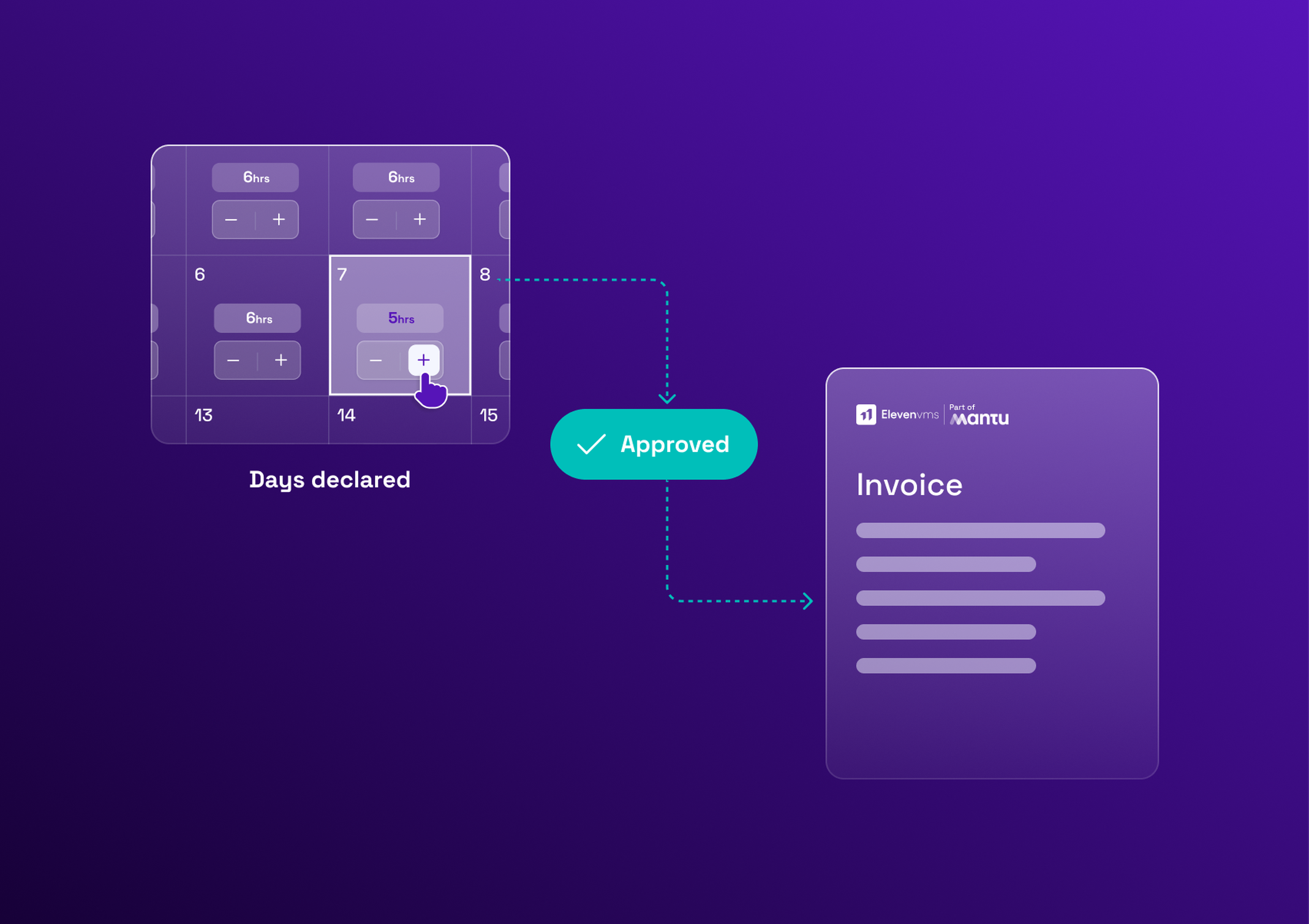
Trigger: delivery confirmed or timesheet validated by the manager.
Invoice matched against the order and receipt → sent to finance.
Trigger: three-way match passes.
Payment status → returned to procurement.
Trigger: payment executed in the ERP.
Each step needs an agreed direction, a clear trigger, mandatory fields, and an owner for exceptions, otherwise mismatches still get resolved manually, which is exactly the failure mode integration is meant to remove.
Why services and external-workforce procurement need a different approach
Goods-oriented ERP integration assumes a catalogue, a quantity and a delivery date. Services and external-workforce procurement don't work that way: delivery is measured in time, milestones or a statement of work, and validation depends on rates rather than unit prices.
A VMS integration typically exchanges:
statement of work (SoW) information: for example, a fixed-price SoW with milestone deliverables, or a time-and-materials SoW capped at a maximum number of days
consultant or external worker details: for example, seniority level and assigned cost centre for a staffing-agency contractor, or the sponsoring manager for an independent consultant
assignment dates and status
rate cards and agreed day rates
validated timesheets
milestone approvals
budget consumption
invoice-related data
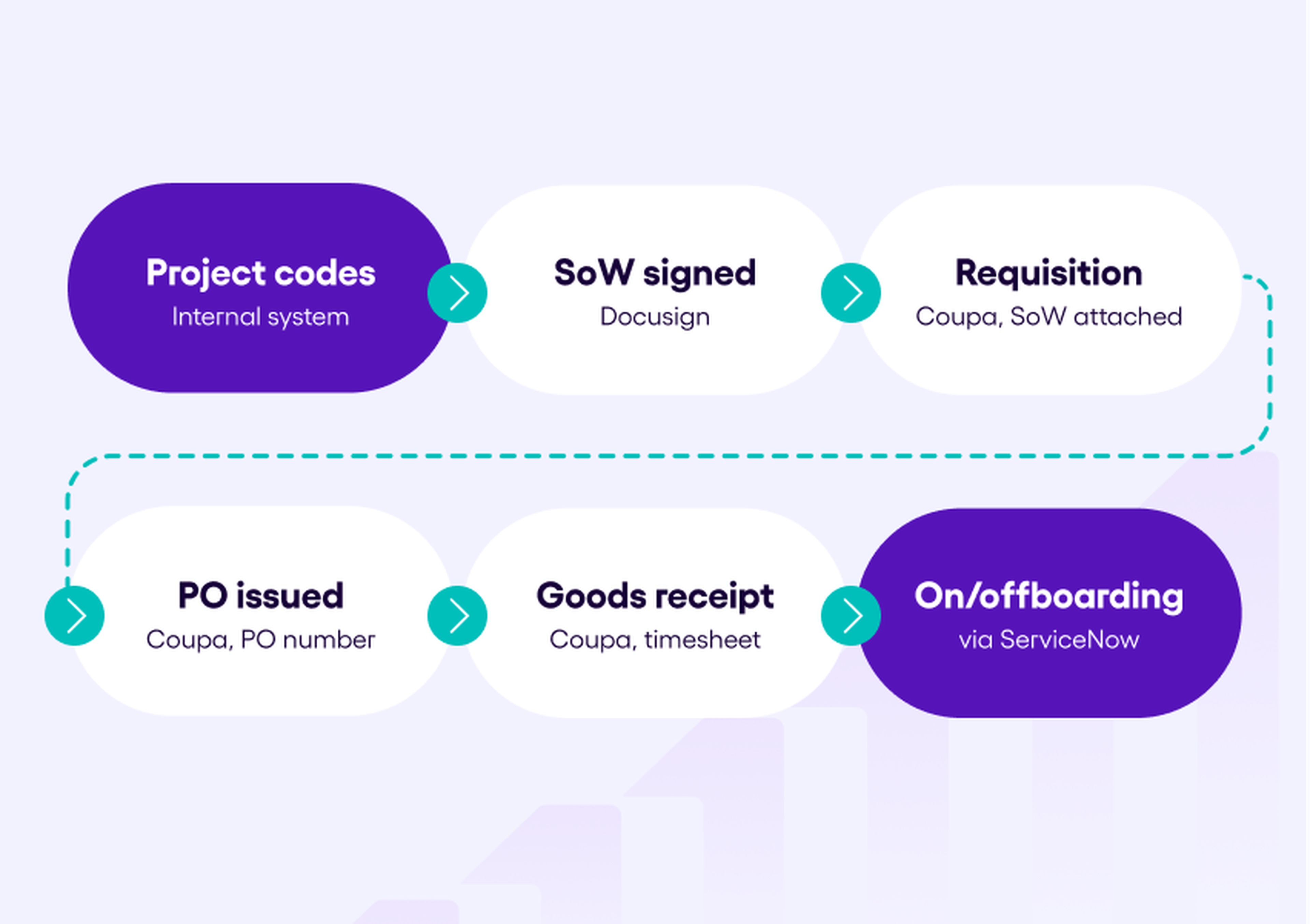
Concretely, here's a possible example: project codes sync from an internal system into Eleven VMS as master data. Once a statement of work is signed through Docusign, the validated SoW flows back into the VMS. From there, a purchase request pushes into Coupa as a requisition, with the SoW attached; once Coupa issues the purchase order, the PO number returns to the VMS project record. A confirmed goods receipt in Coupa validates the corresponding timesheet in the VMS. Project events also trigger onboarding and offboarding: a new assignment creates a ticket in ServiceNow via Usercube, and a notification fires when the PO reaches its end date.
Eleven VMS sits as an operational layer between the e-procurement suite and the ERP for this scope, exchanging the data above without replacing either system. Exactly which data flows where depends on the organisation's existing architecture, see how a VMS and e-procurement tools complement each other for the fuller picture.
How to run a procurement integration project
Map current processes and data owners
Identify which systems, teams and data objects are involved today, and who owns each one.
Define objectives and scope the first phase
Pick one process to connect first rather than integrating everything at once, this is where most projects go wrong.
Choose the integration method
Match the method to the need, using the comparison above: point-to-point for a single simple link, middleware once several systems are involved, API-based for real-time status, file-based for high-volume legacy syncs.
Agree data mapping and the system of record
For each data object, define the field mapping, the format, and which system is the source of truth.
Build, test with real data, and run in parallel
Cover system integration testing and user acceptance testing, including incomplete fields, rejected records, duplicates and failed exchanges.
Train users and monitor after go-live
Move to production, monitor the flows, and assign who handles errors and corrections once the connection is live.
A single, scoped API integration can take a few weeks; a multi-system middleware project takes longer and typically involves procurement operations, IT, finance and the vendor. If you're unsure where to start, assess your procurement maturity before scoping the first phase.
Common procurement integration mistakes
Connecting everything at once instead of phasing: start with one priority process, then expand.
Leaving data ownership unclear: define the source of truth for each data object before building anything.
Syncing dirty master data: duplicate or incomplete supplier and cost-centre data gets replicated everywhere, not fixed.
Point-to-point sprawl: connections that work at two systems become unmanageable at six.
No error monitoring: failed or rejected exchanges need alerts and an owner, not a manual check.
Treating integration as IT-only: Procurement, Finance, HR and Operations all depend on the result.
Connect procurement to the rest of your stack
The right integration model depends on what you already have in place, ERP, e-procurement, identity systems, not on picking the most sophisticated method available for its own sake. Eleven VMS runs the complete Source-to-Pay platform for external services, connected to your existing systems through a dedicated integration team rather than requiring you to rebuild your stack around it.
Book a meeting with one of our experts for a personalized demo.